
A client sends a 250-word script for a retail explainer. Straightforward job, per-word rate, quote out before lunch.
Then I get into the booth and the first line reads:
Get the complete kit for $1,500, call 1-800-555-0199 before 12/31.
My word processor counts that as ten words. Here is what came out of my mouth:
Get the complete kit for one thousand five hundred Dollars, call one, eight hundred, five five five, zero one nine nine before December thirty-first.
Twenty-five words. On one line.
That is the gap between a written word count and a spoken word count, and if you quote voice over work per word, it is the gap you are absorbing for free. Across a whole script thick with prices, phone numbers, dates, and URLs, it stops being a curiosity and starts being money.
I had been quoting on the wrong number for years without really noticing. So I built a tool that counts the way I speak. You’ll find it at VOWordCounter.com. It is free, and this post is about the problem it solves, and how the two calculators on it work.
Why the word count in your text editor shows you the wrong number
Microsoft Word, Google Docs, and every generic online word counter are doing exactly what they were designed to do. They count words separated by spaces on a page. They provide the right answer for an editor checking article length. But it is the wrong answer for anyone who has to speak the sentences out loud.
Speech expands written shorthand. It expands it a lot:
- Currency.
$1,234.56is one written word. Spoken, it is “one thousand two hundred thirty-four dollars and fifty-six cents.” Eleven words. - Phone numbers.
1-800-555-0199is one written word and around ten spoken ones, depending on how you group the digits. - Dates.
12/31is one written word. “December thirty-first” is three, and “the thirty-first of December” is five. - URLs and emails.
vowordcounter.comis one written word. “V O word counter dot com” is six. - Measurements.
10kmis one written word. “Ten kilometres” is two, and250 km/his six. - Percentages, symbols, and ordinals.
%,#,@,1st,1/2. All of them expand, none of them are counted, and that’s an important distinction.
Notice the direction. Every one of these expansions from written to oral form makes the script longer than it looks, never shorter. The written count, therefore, is not a rough estimate of the final word count that might land either side of the truth. No! It is a floor, and on commercial copy it could be a distant one. Let’s not fall for this.
What is a spoken word count, exactly?
A spoken word count is the number of words you will actually say, once every piece of written shorthand has been expanded into speech.
A spoken word count matters for three separate reasons:
- Your quote. If you charge per word, the spoken count is the actual measured count of words that you’ll deliver. It’s the honest value for the work done.
- Your timing. Recording length is spoken words divided by your speaking pace. Feed it the written count and your estimate will be wrong.
- Your session. Nobody wants to discover halfway through a take that the client’s 200-word script does not fit their :60 slot.
The Script Counter: a word counter that counts the way you speak
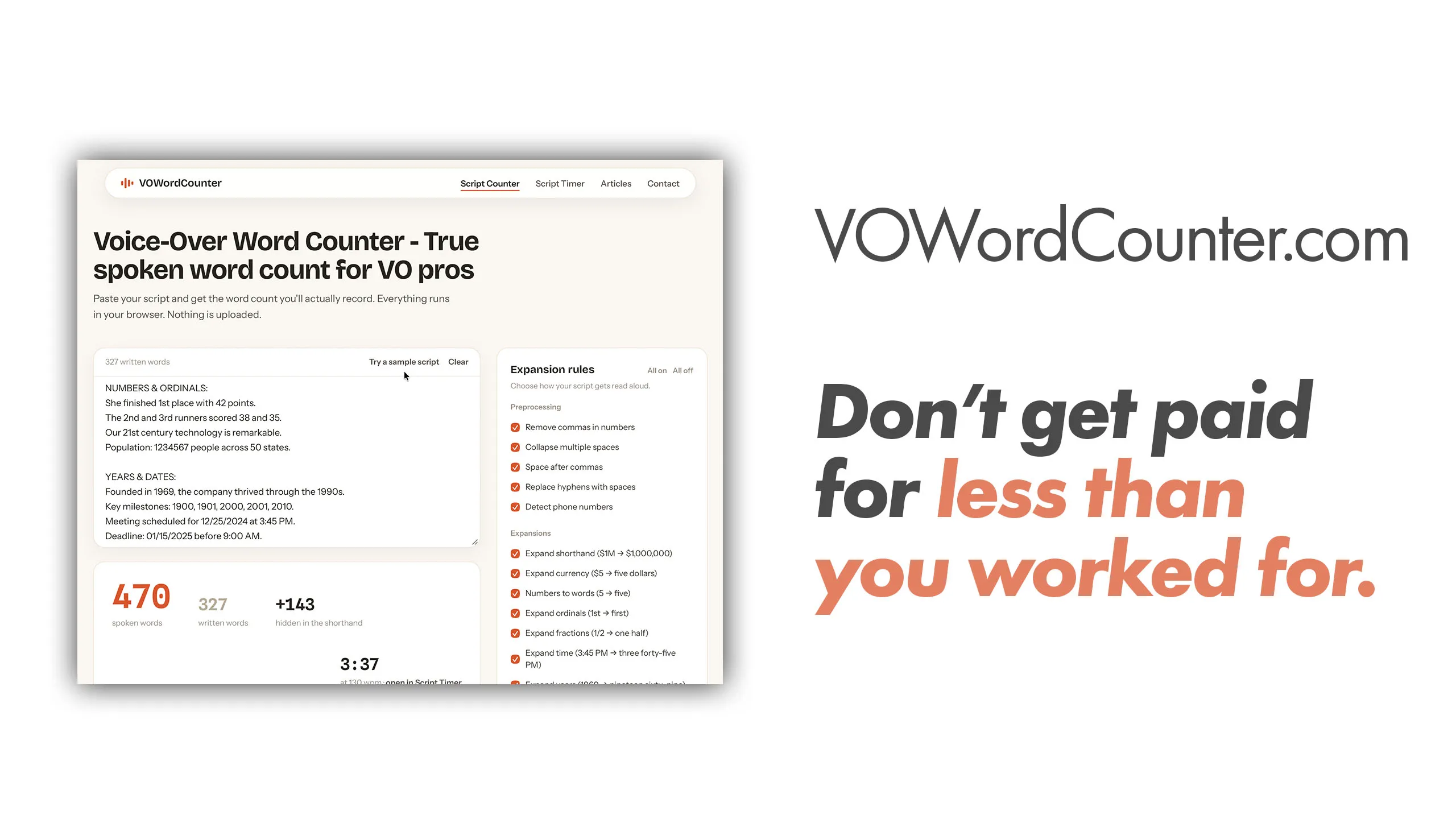
This is the main calculator tool on the website, and the one that took the real work. You paste your script into the Script Counter and it gives you back two numbers: your original written count, and your true spoken count. It also gives you the fully expanded script, so you can see exactly what changed and where.
It updates live as you type or paste. There is no submit button and no waiting. Live output.
Every expansion is a toggle you control. There are nineteen rules, split into preprocessing (removing commas in numbers, collapsing spaces, detecting phone numbers) and expansions (currency, numbers to words, ordinals, fractions, times, years, ranges, dates, URLs, emails, measurements, symbols). This part is important… Voice artists do not all read the same way. You might read a URL letter by letter while I say “dot com.” You might say “nineteen ninety-nine” where the script says $19.99, or “nineteen dollars and ninety-nine cents.” Flip off the rules that do not match how you read, and the counter matches your mouth instead of somebody else’s. It remembers your settings for next time.
Underneath the kilt, it handles 43 different currencies with their fractional units, 60-plus measurement units across metric, imperial, and scientific systems, SI prefixes, compound units like km/h and kWh, Unicode fractions, shorthand like $1.5M, and dates in several formats. It takes a paste straight out of Word or Google Docs and normalises the smart quotes and odd dashes on the way in. Do check the output to be sure, though.
Your script never leaves your browser. The entire tool is secure. Nothing is uploaded, nothing is stored on a server, and there is no account to create. That was not a nice-to-have. Plenty of the scripts I am sent are under NDA long before they are public, and pasting a client’s unreleased campaign into somebody else’s server is not a thing I am willing to do. If I would not do it, I am not going to ask you to.
No expansion engine catches every quirk of how people write numbers, so read the processed output before you record. That’s likely to be thirty seconds well spent, and it’s likely the same thirty seconds that you were going to spend preparing anyway, so that you don’t stumble on a line.
How much difference does the script counter actually make?
On clean narrative prose, the script word counter makes very little difference… An audiobook chapter of dialogue and description might expand by one or two percent, and you can safely ignore it.
On commercial copy, the picture changes completely. Retail and direct response scripts are built out of exactly the things that expand: prices, offer dates, phone numbers, web addresses, percentages off. A 250-word script on the page can run past 400 words at the microphone. That is not a rounding error. That is sixty percent more work than the number you quoted on.
E-learning and corporate narration sit in between, and they surprise people. Compliance modules are full of dates, clause numbers, and figures. Technical training is full of measurements and part codes. IVR prompts are almost entirely numbers. Be sure to check these types of scripts thoroughly.
The lesson is not that you should mark everything up. It is that you should know which kind of script you are looking at before you name your price. Two scripts with the same word count in Word can be very different jobs when you’re in front of the microphone.
The Script Timer: turning a word count into a runtime
The second tool on VOWordCounter answers the next question. You know the word count, so now how long will the finished recording be?
The Script Timer takes a word count and a speaking pace and returns the finished length in hours, minutes, and seconds. The maths is not complicated, and that is rather the point. It is the arithmetic you would otherwise do badly in your head while a client waits on the phone.
The pace slider runs from 70 WPM, slow enough for meditation and dramatic reads, up to 220 WPM for disclaimers and auctioneer work. There are six genre presets that cover most of what lands in the inbox:
- IVR and telephony: 110 WPM
- E-learning: 115 WPM
- Audiobook: 120 WPM
- Documentary: 130 WPM
- Soft-sell commercial: 145 WPM
- Hard-sell commercial: 170 WPM
Commercial work is where this tool earns its place, because an ad spot runs against a fixed clock. A :30 is thirty seconds whether or not your script fits. Set the pace to a commercial 150 to 170, enter your spoken count, and you know before you book the session whether the copy needs trimming or the read needs lifting. Finding that out in the booth is a worse day for everyone.
Two honest caveats.
- The timer assumes a steady pace, so it does not model pauses, breaths, emphasis, or character beats. For a slow, deliberate read with real air in it, add ten to twenty percent.
- And feed it your spoken count, not your written one, or you have simply moved the error from one tool to the next.
Who needs VOWordCounter.com? Anyone quoting for voice over work, per word.
If you charge by the finished hour or by the project, this is a timing aid and a sanity check.
If you charge per word, it is a pricing tool, and the difference is whether you feel like you’ve been ripped off, or not. I don’t like feeling ripped off. That’s why I made it. It is a small piece of a bigger problem, which is that rates in this market are already under enough pressure without artists quietly absorbing words they were never paid for.
Per-word pricing is the default on Fiverr, Upwork, Freelancer, and most of the audiobook and e-learning marketplaces. It is also common in direct client work in India, where a rate per hundred words is often how the conversation opens. In every one of those cases the client is quoting you a number pulled straight from their document, which means the number is the written count, which means it is almost certainly lower than the number of words you’ll be speaking.
Worth running the counter over the script before you accept:
- Marketplace voice artists taking per-word gigs where the buyer sets the count.
- Audiobook narrators estimating chapter and total runtime for a PFH quote.
- Commercial talent checking whether copy fits a :15, :30, or :60 before the session.
- E-learning narrators timing modules against a client’s fixed duration.
- Podcast producers structuring segments to a consistent runtime.
- IVR and telephony work, which is numbers almost end to end and expands the hardest of anything on this list.
You do not have to raise your rate to earn more from the same script. Quite often you just have to count it properly. Plus, you get your client to use the tool directly to verify the figure.
How I use both tools before I send a quote
Three steps, about two minutes:
- Paste the script into the Script Counter. Read the expanded output, and check the two counts against each other. If the gap is large, I now know this is a heavier job than the client thinks it is.
- Put the spoken count into the Script Timer at the pace the genre calls for. That gives me the finished runtime, which is the number that tells me whether the session is twenty minutes or two hours.
- Quote on both. The spoken count and the runtime together describe the actual work. What that work is worth is a separate question, and it depends on far more than length: I have written a fuller answer on what a voice over costs in India, and on usage, term, and territory, which usually matter more to the final figure than the word count does.
Counting the script’s word length properly does not tell you what to charge. It tells you what you are charging for, which is where every accurate voice over quote has to start.
Count what you say out loud, not what you see on paper
I built VOWordCounter because I was tired of doing this arithmetic by hand and tired of getting it slightly wrong. It solved a problem I had. Then it turned out to be a problem shared by every voice artist I mentioned it to, which is why it is public, free, and always staying that way.
Both tools are live at VOWordCounter.com. No sign-up, no limits, no ads, and no privacy concerns because the text does not leave your computer.
If you use VOWordCounter.com and something expands the wrong way for how you read, tell me. Please! That is exactly the sort of thing I want to hear about, and it is how the rule list on the page got to nineteen in the first place.